Version Control System, Git and GitHub Collaboration

A Comprehensive Guide for Web & Mobile Developers

⏱️ 15 minute read

Table of Contents

1. Introduction to Version Control Systems

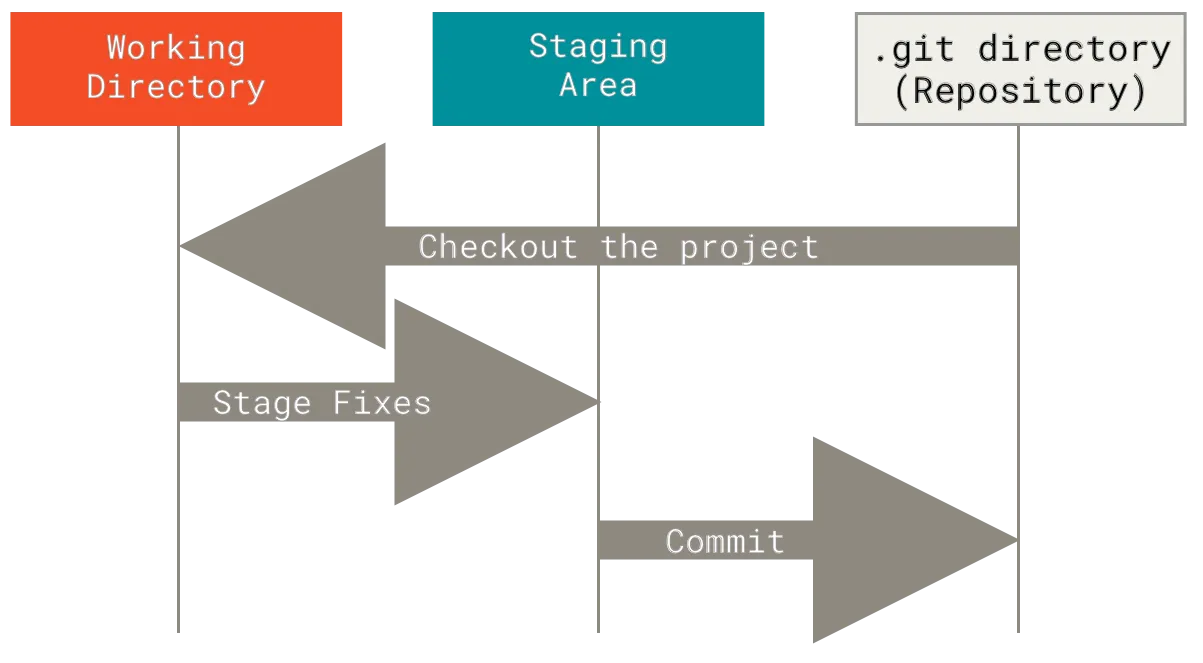
Git workflow diagram

Git's three-tree architecture (Working Directory, Staging Area, Repository)

What is Version Control?

A system that records changes to files over time, allowing you to:

Types of Version Control

Type Description Example When to Use
Local Tracks changes on a single machine RCS, SCCS Individual projects with no need for collaboration
Centralized Single server hosts all versions SVN, CVS Small teams with centralized infrastructure
Distributed Every user has a full repository copy Git, Mercurial Modern development (teams, open source, etc.)

Why Git?

2. Git Fundamentals

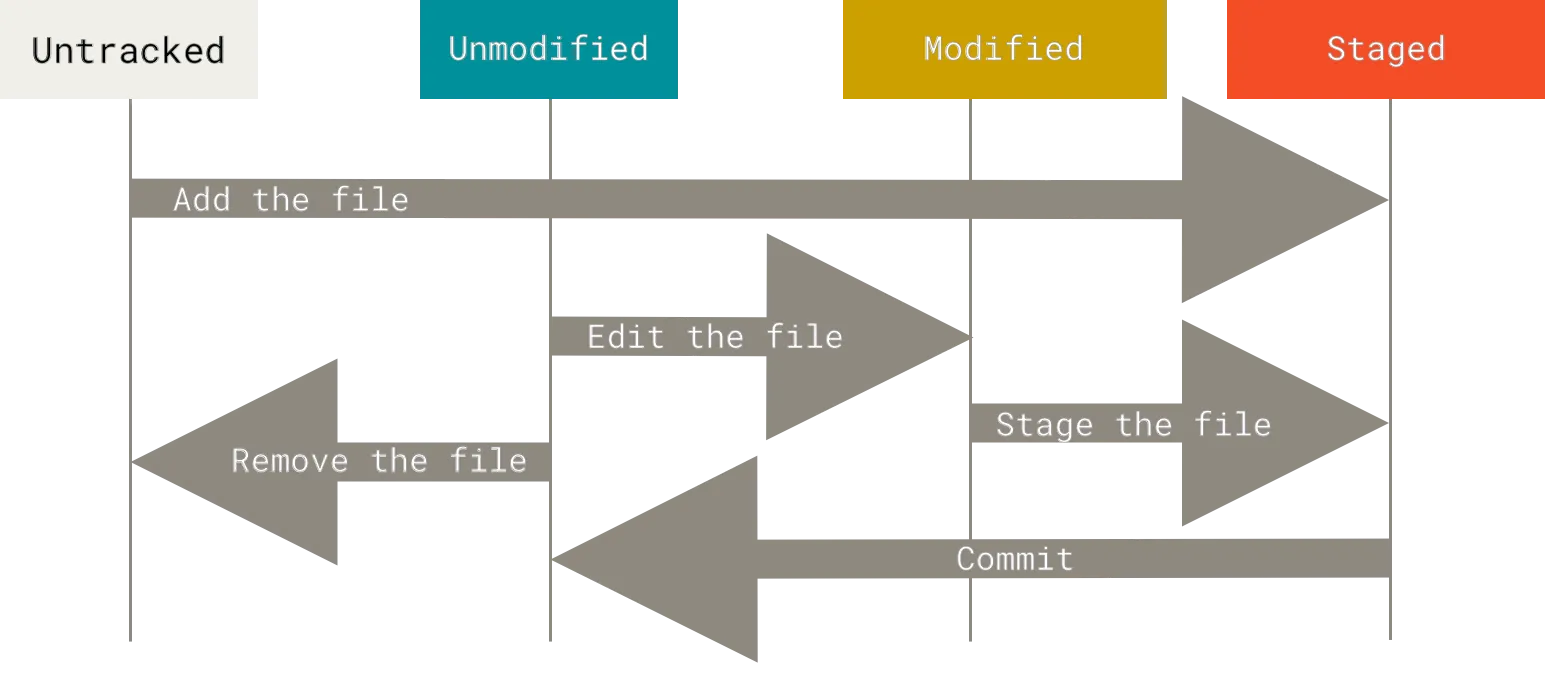
Git file lifecycle

Git file lifecycle - from untracked to committed

Key Concepts

Essential Commands

1. Setup & Basics

Initialize a new repository
git init
Creates a new .git directory in your project
Clone an existing repository
git clone https://github.com/user/repo.git
Downloads the entire repository with history
Check repository status
git status
Shows changed, staged, and untracked files

2. Making Changes

Stage specific files
git add index.html styles.css
Prepares specific files for committing
Stage all changes
git add .
Prepares all modified and new files
Commit staged changes
git commit -m "Add user login functionality"
Creates a permanent snapshot with a message

Commit Message Guidelines:

3. Branching

* main
|
| * feature/login (HEAD)
| |
| * Add login form
|/
* Initial commit
List all branches
git branch
Shows local branches (* marks current)
Create and switch to new branch
git checkout -b feature/login
Creates branch and moves HEAD to it
Switch between branches
git checkout main
Moves HEAD to specified branch
Merge branches
git merge feature/login
Combines feature/login into current branch

Modern Git Alternative

Git 2.23+ introduced git switch and git restore:

git switch -c new-feature  # Create and switch
git switch main        # Switch branches

4. Undoing Changes

Undo last commit (keep changes)
git reset --soft HEAD~1
Moves HEAD back but keeps changes staged
Discard file changes
git checkout -- index.html
Reverts file to last committed state
Create undo commit
git revert a1b2c3d
Safely reverses a specific commit

Dangerous Reset

git reset --hard HEAD~3

This will permanently delete the last 3 commits and all their changes. Use with extreme caution!

5. Viewing History

Compact log with graph
git log --oneline --graph --all
Visualizes branch structure
See changes in commits
git show abc123
Displays full details of a commit
Compare branches
git diff main..feature
Shows all differences between branches

3. GitHub Collaboration

GitHub Workflow

  1. Fork the repository
  2. Clone your fork locally:
    git clone https://github.com/your-username/repo.git
  3. Add upstream (original repo):
    git remote add upstream https://github.com/original-owner/repo.git
  4. Sync with upstream:
    git fetch upstream
    git merge upstream/main

Pull Requests (PRs)

Open Source Contribution

4. Practical Task: Branch Creation & Submission

Task Instructions

  1. Fork the test repository:

    https://github.com/ShMazumder/test-examples

  2. Create a branch named after your GitHub username:
    git checkout -b your-username
  3. Make changes (e.g., add a file with your name)
  4. Push your branch:
    git push origin your-username
  5. Create a Pull Request to the original repository

Important: Your branch name must exactly match your GitHub username for verification.

Verification Form

5. Best Practices & Workflow

Git Hygiene

Branching Strategies

Strategy Use Case
Feature Branches New functionality (e.g., feat/user-auth)
Hotfix Branches Critical bug fixes
Git Flow Complex projects with versions

CI/CD Integration

Automate testing with GitHub Actions:

name: Node.js CI
on: [push]
jobs:
  test:
    runs-on: ubuntu-latest
    steps:
      - uses: actions/checkout@v2
      - run: npm install && npm test

Next Steps

  1. Practice daily with small projects
  2. Contribute to open-source repositories
  3. Explore advanced Git features (rebase, submodules)

Pro Tip: Maintain a DEVLOG.md to document your learning journey!